Your Kubernetes CronJobs Web UI
CronJobs are great right up until you need to answer a very ordinary question: Did that thing run, and what happened?
The answer is usually somewhere between a terminal, a namespace, a handful of kubectl commands, and one more YAML file than you wanted to read today.
jobs-dashboard brings the essentials into one small, self-hosted web app: schedules, recent runs, quick controls, and a direct look at what each Job actually did.
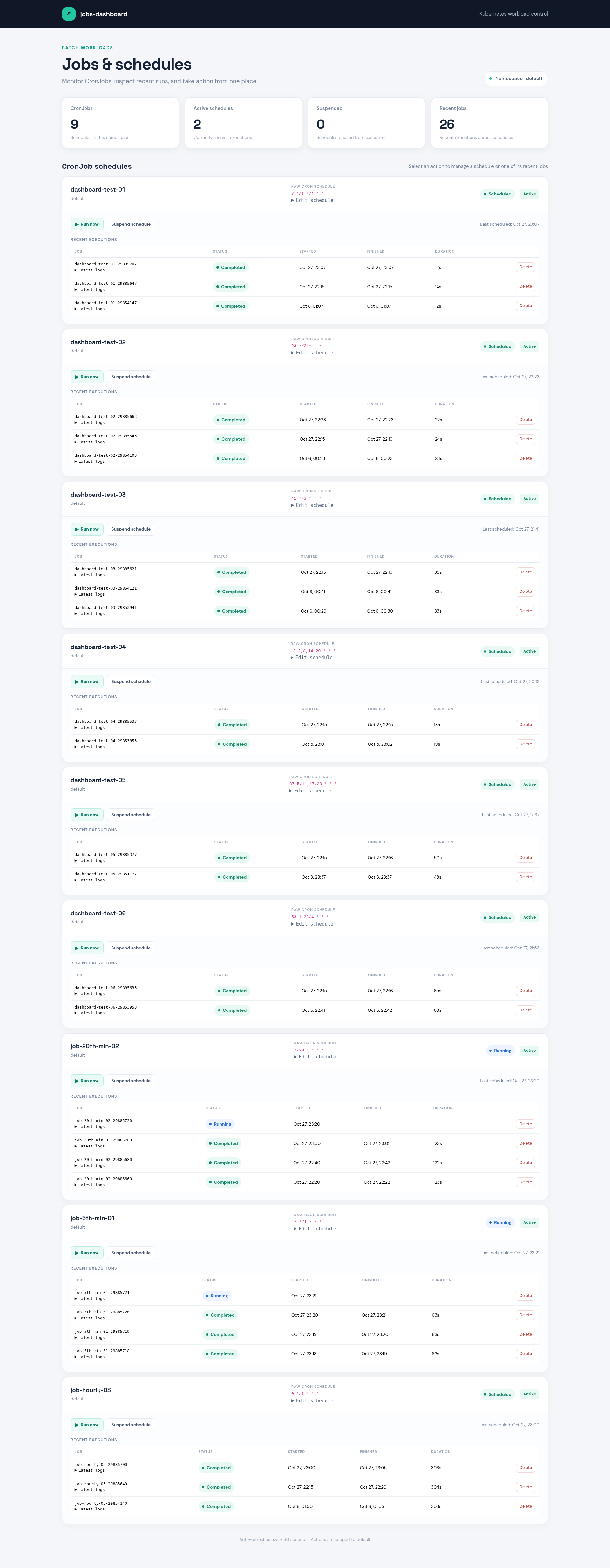
A useful view, not another control plane
The dashboard keeps the focus on the daily workflow. See CronJob schedules and whether they’re active or paused. Scan recent executions, check their status and duration, and kick off a run when you need one now—not at the next scheduled interval.
Need to pause a noisy schedule? Suspend it. Ready to bring it back? Resume it. Need to adjust when it runs? Edit the raw cron expression and let Kubernetes validate it. You can also delete a Job from the dashboard when a run no longer needs to stick around.
And when a run needs investigating, open its dropdowns: inspect the newest Pod’s logs or view the Job manifest as YAML. Both load when requested, so the dashboard doesn’t fetch every log just to paint the page.
Small on purpose
The app is written in Go, renders its UI on the server, and uses HTMX for refreshes and actions. It talks to the Kubernetes API with its in-cluster ServiceAccount and scopes its requests to the configured namespace. It’s designed to run inside Kubernetes rather than as a local app; the sample deployment keeps permissions scoped to the namespace it manages.
There’s no separate database or sprawling service stack to maintain—just the dashboard, Kubernetes, and the permissions needed to do its job.
Open source, and honest about auth
OAuth2-proxy support is included as an environment-variable switch, but it is disabled in the sample deployment. That means the dashboard is unauthenticated by default. Keep it behind trusted network controls; don’t expose it to the public internet as-is. When you’re ready to enable authentication, configure oauth2-proxy, set OAUTH2_PROXY_ENABLED=true, and provide the dashboard’s public HTTPS origin. Keep OAuth credentials and the cookie secret in a Kubernetes Secret or external secret manager, not in the ConfigMap.
The Kubernetes example uses namespace-scoped RBAC, and the project includes tests, a Makefile, CI checks, and a release workflow that builds multi-platform images for GHCR and generates release notes from changes since the previous tag.
Put an access boundary in front of it
With oauth2-proxy disabled, the dashboard has no user login. Keep the Service private and put an access control at the ingress. Two practical options:
Cloudflare
For a simple setup, use Cloudflare Tunnel with Cloudflare Access. Create an Access application for the dashboard hostname, allow only the users or groups that need it, and route the hostname through the tunnel to the in-cluster Service. Do not also expose the Service through a public LoadBalancer or NodePort.
If you use the regular Cloudflare proxy instead, restrict the origin firewall so it accepts traffic only from Cloudflare’s published IP ranges. Keep those ranges updated. This limits direct-origin bypass, but the IP allowlist alone does not authenticate users: add a Cloudflare Access policy if the hostname should be private. Do not treat CF-Connecting-IP or other forwarded headers as proof of identity.
Mutual TLS with ingress-nginx
This example assumes the community ingress-nginx controller and that the dashboard Service is in the jobs-dashboard namespace. The Ingress terminates HTTPS and requires a client certificate signed by your CA. Keep the CA private key offline; Kubernetes only needs the public CA certificate.
Create a protected working directory and a small CA:
umask 077
mkdir -m 700 -p mtls-work
cd mtls-work

openssl genpkey -algorithm RSA \
  -pkeyopt rsa_keygen_bits:4096 \
  -out client-ca.key

openssl req -x509 -new -sha256 -days 3650 \
  -key client-ca.key \
  -out client-ca.crt \
  -subj "/CN=jobs-dashboard client CA" \
  -addext "basicConstraints=critical,CA:TRUE" \
  -addext "keyUsage=critical,keyCertSign,cRLSign"
Create a client key and certificate. Give each authorized person or device its own certificate so it can be revoked and rotated independently:
openssl genpkey -algorithm RSA \
  -pkeyopt rsa_keygen_bits:2048 \
  -out dashboard-client.key

openssl req -new \
  -key dashboard-client.key \
  -out dashboard-client.csr \
  -subj "/CN=dashboard-operator"

cat > client.ext <<'EOF'
basicConstraints=critical,CA:FALSE
keyUsage=critical,digitalSignature,keyEncipherment
extendedKeyUsage=clientAuth
EOF

openssl x509 -req -sha256 -days 365 \
  -in dashboard-client.csr \
  -CA client-ca.crt \
  -CAkey client-ca.key \
  -CAcreateserial \
  -extfile client.ext \
  -out dashboard-client.crt
Create the Kubernetes Secrets in the same namespace as the Ingress. The TLS Secret needs a server certificate valid for jobs.example.com; obtain it from your certificate issuer. Do not upload client-ca.key or dashboard-client.key to the cluster.
kubectl -n jobs-dashboard create secret generic jobs-dashboard-client-ca \
  --from-file=ca.crt=client-ca.crt

kubectl -n jobs-dashboard create secret tls jobs-dashboard-tls \
  --cert=server.crt \
  --key=server.key
Apply this Ingress (change the hostname and TLS Secret as needed):
apiVersion: networking.k8s.io/v1
kind: Ingress
metadata:
  name: jobs-dashboard
  namespace: jobs-dashboard
  annotations:
    nginx.ingress.kubernetes.io/auth-tls-verify-client: "on"
    nginx.ingress.kubernetes.io/auth-tls-secret: "jobs-dashboard/jobs-dashboard-client-ca"
    nginx.ingress.kubernetes.io/auth-tls-verify-depth: "1"
    nginx.ingress.kubernetes.io/ssl-redirect: "true"
spec:
  ingressClassName: nginx
  tls:
    - hosts:
        - jobs.example.com
      secretName: jobs-dashboard-tls
  rules:
    - host: jobs.example.com
      http:
        paths:
          - path: /
            pathType: Prefix
            backend:
              service:
                name: jobs-dashboard
                port:
                  number: 80
Save that as jobs-dashboard-ingress.yaml and apply it:
kubectl apply -f jobs-dashboard-ingress.yaml
Install dashboard-client.crt and dashboard-client.key in the user’s browser or client. Test that a request without a client certificate is rejected, and one with the issued certificate succeeds:
curl -i https://jobs.example.com/
curl --cert dashboard-client.crt --key dashboard-client.key \
  -i https://jobs.example.com/
Restrict the dashboard Service to ClusterIP and make sure there is no alternate public route to the app. Protect and back up the CA key offline; anyone who obtains it can issue accepted client certificates. Replace the client certificate before it expires, and plan CA rotation separately.
In either setup, allow public traffic only through the chosen access boundary, use HTTPS, and verify that the dashboard cannot be reached through a second route. These controls protect the dashboard at the network edge; enabling oauth2-proxy later adds application-level authentication as well.
Take it for a spin
Build and check it out from a clone:
make check
make build
To deploy, customize k8s/manifest.yaml, publish an image your cluster can pull, and apply the manifest:
kubectl apply -f k8s/manifest.yaml
kubectl -n jobs-dashboard rollout status deployment/jobs-dashboard
The dashboard won’t replace kubectl—and that’s the point. It gives the repeatable, everyday CronJob work a friendly home, while leaving the full Kubernetes toolbox exactly where it belongs.
Less context switching. Fewer YAML safaris. Happier scheduled jobs.